Anchors and Links
Accessible web links prevent barriers for users who rely on assistive technologies such as screen readers to interact and navigate.
Link content
When writing text content for a link, use concise but complete text describing the linked resource. This is particularly important for those who use a screen reader to scan the entire webpage and read out a list of only the links, where each link will have no context and must be understood on its own. For example, a series of article summaries, each containing a link with the text "Read more," will be presented as a list of many "Read more" snippets to the screen reader user, with no indication of what following any link will allow the user to read more about.
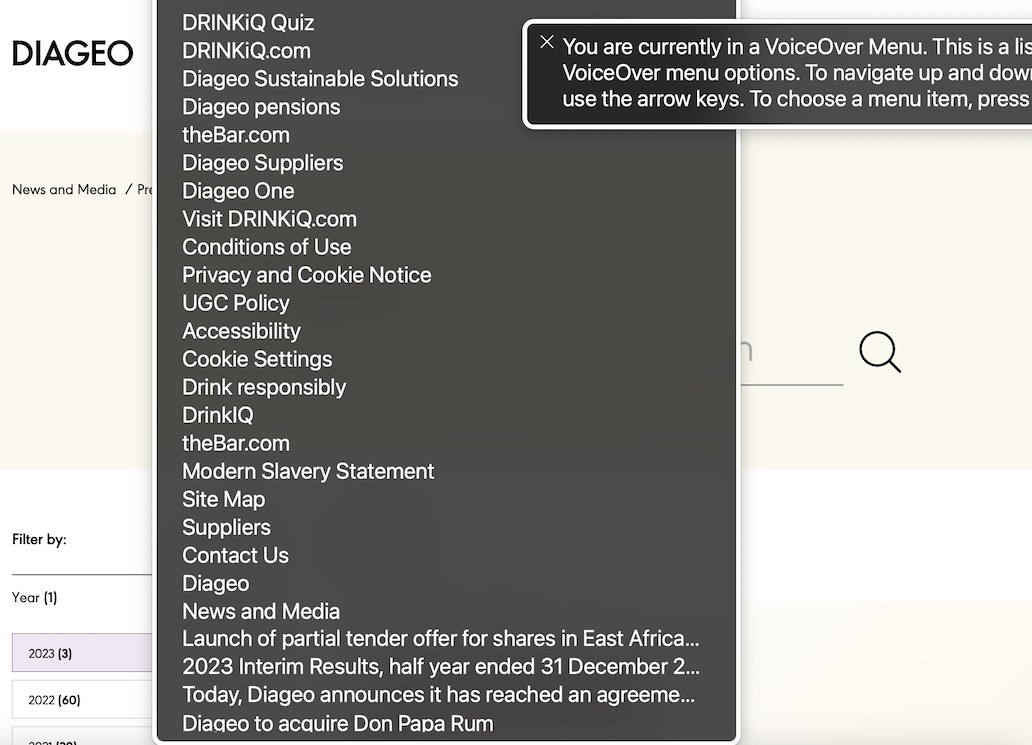
A list of links presented by a screen reader. The text from each link is read without any context from where it appears on the webpage.
Adding the missing context to the link text will remove barriers for screen reader users and will likely help sighted users keep track of what they are linking to. In exceptional cases, where it would be redundant or distracting for sighted users to read the full details in the link content, this can be managed by adding the context as visually hidden text available only to screen reader users.
<a href="#values">
  Read more<span class="visually-hidden"> about our values</span>...
</a>
Screen reader: "link, Read more about our values ..."
Although the link text visually appears as only "Read more" in the context of the article entitled "Our Values," it will appear as "Read more about our values..." when a screen reader user opens the list of all links from the webpage.
Icons in links
While having descriptive, visible text is the most accessible way to label a link, there are use cases where a well-understood icon would be more natural. In these cases, alternative text must be supplied for screen reader users who cannot see the icon.
A simple HTML img element will display the icon. Screen readers will announce that an "image" is present and read out any text in the element's alt attribute. Choose an alternative text that summarizes the meaning of the image; there's no need to explain that it is an "image," "icon," or "picture" in the alternative text.
Follow Us
<div class="social-links">
  <a href="#toot">
    <img class="icon icon-inline" src="/static/icons/mastodon.svg" alt="Mastodon">
  </a>
</div>
Screen reader: "Follow Us"
Screen reader: "link, image, Mastodon"
Translation services
Not every string of text on a webpage will be available to translation services, like Google Translate. When choosing a technique for adding alternative text to a webpage, it's essential to ensure that this text, which screen reader users will rely on, will also be translated. Test any translation tools or services your website plans to support to ensure that alternative text is supported.
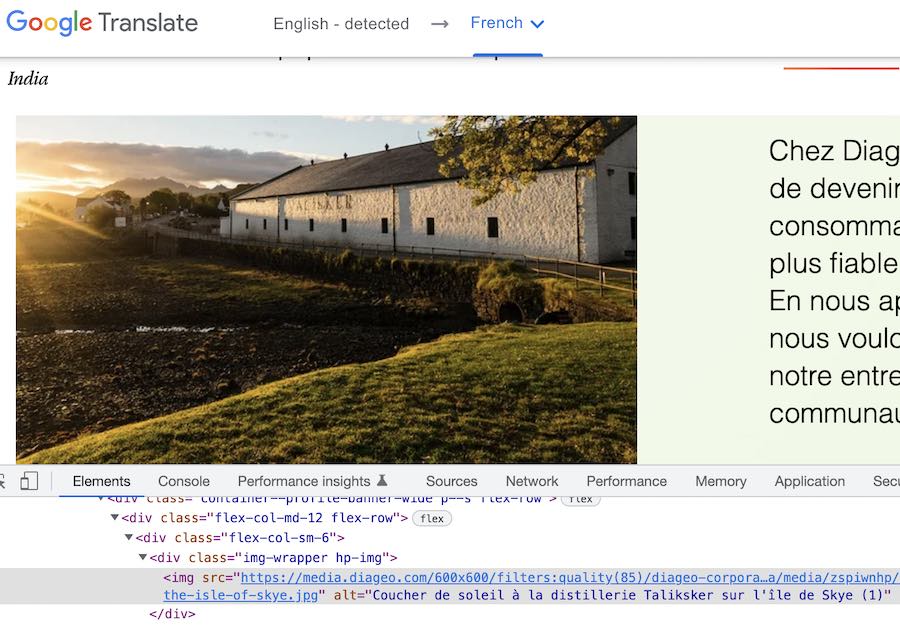
Originally in English, the service has translated the page into French. We can see that the text in the image element's alt attribute has also been translated into French.
External links
When linking to external websites, it is a good idea from a security and accountability perspective to inform the user that they are about to visit content you are not responsible for. This can be a concern if the user is logged into your site or has some other session that would be interrupted or dropped once they leave your site.
New tabs
Opening links in new tabs or windows can make some users' experience more confusing and less accessible, so it should be used rarely. One exception may be links to external websites. [1]
In the following examples, notice the noreferrer and noopener values in the link's rel attribute. This follows good security practices when opening a new browser tab by preventing information about, or access to, the current tab from inadvertently being made available to the new tab. While not normally a problem, if the website you are linking to were hacked, such information or access could be useful to anyone wanting to trick the user. [2]
Using an icon to signal new tabs
a.is-external:after {
  content: "(external website, opens in new tab)";
  clip: rect(0 0 0 0);
  clip-path: inset(50%);
  height: 1px;
  overflow: hidden;
  position: absolute;
  white-space: nowrap;
  width: 1px;
}
a.is-external {
  background-size: 1em 1em;
  background-repeat: no-repeat;
  background-position: right center;
  padding-right: 1.2em;
  background-image: url(/static/img/icons/new-tab.svg);
}<p>
Our suppliers use
<a href="#sustainable" class="is-external" target="_blank" rel="noopener noreferrer">sustainable practices</a> to grow our spices and flavorings.
</p>Screen reader: "link, sustainable practices, (external website, opens in new tab)"
Links to phone numbers
Using the most appropriate URI scheme in the href attribute for web links can make your contact information more usable, especially for users with disabilities. [3] Some examples are shown below.
[itemprop="telephone"]:before {
  content: "\260e";
  content: "\260e" / "telephone";
  margin-right: 1em;
}
Notice that in the example HTML below, we use the "LocalBusiness" micro-data scheme to encourage search engines to display the business contact data in the most usable format. [4] This can make searching for and dialing a business phone number a much easier task, especially for users of assistive technologies.
<div itemscope itemtype="https://schema.org/LocalBusiness">
  Get in touch:
  <span itemprop="telephone">
    <a href="tel:+441234567890">+44 1-2345-67890</a>
  </span>
</div>
Screen reader: "Get in touch: telephone"
Screen reader: "link, +44 1-2345-67890"
While a web link that automatically opens a telephone application would mainly be helpful on mobile phone devices, don't try to disable the default telephone link functionality on desktop devices. Most modern desktop operating systems allow you to call via a telephone link. Desktop VoIP apps, like FaceTime, Microsoft Teams Voice, or Skype, can be configured to handle the tel: scheme in web links. MacOS, for example, supports making phone calls from the desktop using an iPhone. [5] This feature type can be beneficial for individuals with disabilities.
Adding anchors to headings
For longer articles, encourage users to copy and share links to specific parts of the web page by adding visible clues that the heading has an anchor link.
h3.is-anchor a {
  background-size: 1em 1em;
  margin-left: -1em;
  padding-left: 1em;
}
.is-anchor a,
.is-anchor a:active,
.is-anchor a:visited {
  background-repeat: no-repeat;
  background-position: 0 center;
  vertical-align: middle;
  color: currentColor;
  text-decoration: none;
}
.is-anchor a:hover,
.is-anchor a:focus {
  background-image: url(/static/img/icons/link.svg);
}<div style="padding-left:1.5em">
<h3 id="fresh-idea" class="is-anchor">
<a href="#fresh-idea">A Fresh Idea</a>
</h3>
<p>
Try a new twist on a favorite drink for summer. It's cool, refreshing, and filled with delicious fruit flavors.
</p>
</div>Screen reader: "heading level 3, link, A Fresh Idea"
The icon that appears on hover (or focus) is implemented as a background image to keep it out of the way of screen readers: the link symbol is a visible but only decorative way of indicating the presence of the anchor link.
Checkpoints for the Tester
- Ensure each link contains visible text or a well-understood, conventional icon.
- For links containing only an icon, ensure that equivalent text is assigned to the graphic so that a screen reader can speak.
- Ensure that all links are consistently and visually distinct from the surrounding text so the user can identify them. Do not use color alone to identify links; this is inaccessible to users with low color perception.
- Ensure that when navigating the web page using the keyboard, it is visually apparent when a link has keyboard focus.
- Ensure that when the links are presented as a list, separate from their surrounding context, they have text or alternative text that is concise but distinctly describes the resource being linked to. (Link text such as "click here," for example, is inadequate.)
- Prefer that when a link contains text along with an icon, where the icon is decorative-only, the screen reader ignores the icon.
- Ensure that examples of multiple links to the same resource are not adjacent or wrapping each other; combine these into a single link instead.
- Ensure that any cases of hidden or alternative text available only to screen readers are not different than the visible text or different from the icon's apparent meaning.
Notes and references
G200: Opening new windows and tabs from a link only when necessary Techniques for WCAG 2.0 back to reference 1
"Tabnabbing is a computer exploit and phishing attack, which persuades users to submit their login details and passwords to popular websites by impersonating those sites and convincing the user that the site is genuine." Tabnabbing, Wikipedia back to reference 2
"Standardized URI schemes have been defined for some common device functions, e.g. making phone calls, sending an SMS, and managing address books. These URI schemes, if supported, can enable users to easily use these functions from Web applications." Make Telephone Numbers "Click-to-Call", W3C Mobile Web Application Best Practices back to reference 3
"FaceTime in macOS 10.10 and later can also use the tel URL scheme to launch the Phone app on an iOS device using Handoff. This scenario works when FaceTime is configured to dial phone numbers (the default configuration) and the iOS device is connected to the same iCloud account as the Mac." Apple URL Scheme Reference back to reference 5